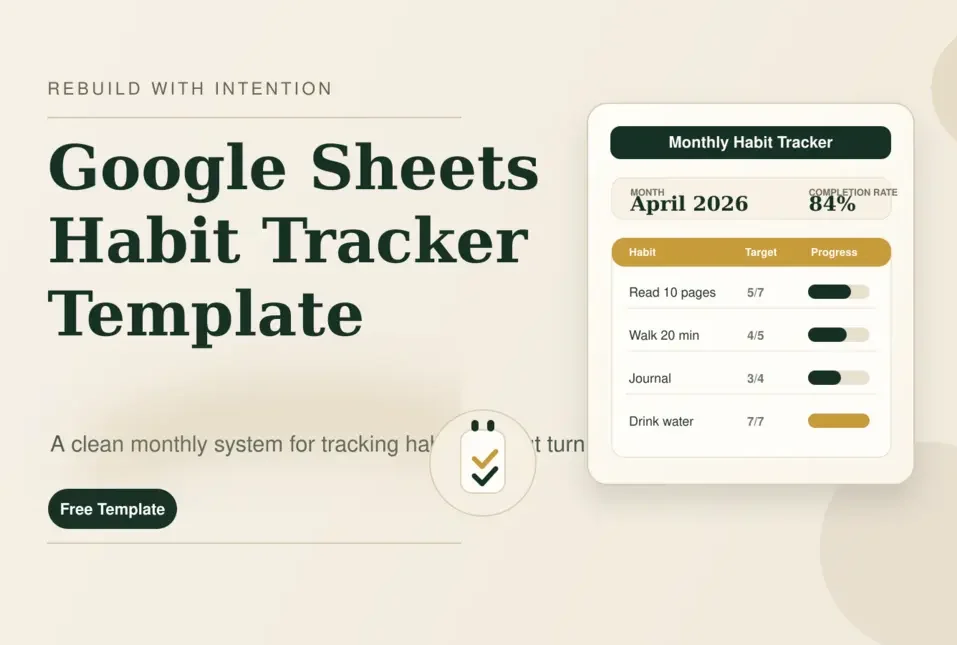
A Google Sheets habit tracker template is a pre-built spreadsheet that helps you track daily and weekly habits, streaks, and progress over time.
If you want a free Google Sheets habit tracker template that is simple to use but still powerful enough to be useful, our tracker is built to do exactly that. It includes:
- a clean monthly tracker
- support for daily and weekly habits
- completion rates
- current streak and best streak tracking
- a dashboard for reviewing progress
- a setup tab for easy customization
Instead of starting from a blank sheet or downloading a generic checklist, I will give you my actual tracker, explain how it works, and show you how to open it in Google Sheets and make your own copy.
Download our Google Sheets habit tracker template
If you came here looking for a Google Sheets habit tracker template you can actually use, here is it. Our free template includes:
1. Setup Tab
Add up to 12 habits, assign categories, and set your custom frequency targets in seconds.
2. Monthly View
The core tracking engine. Visualize your daily progress and monitor live streaks automatically.
3. Dashboard
A high-level view of your consistency, top habits, and trend lines to help you stay motivated.
4. Calculation Engine
The background logic that keeps your sheets clean while doing the heavy mathematical lifting.
Ready to start tracking?
Get your free Habit Tracker Template below. Choose “Make a Copy” to save it directly to your Google Drive for instant use.
This template is built for users who want a real habit tracker, not just a decorative spreadsheet.
What is a Google Sheets habit tracker template?
A Google Sheets habit tracker template is a spreadsheet designed to help you track recurring behaviors such as reading, walking, journaling, hydration, sleep, saving money, stretching, or focused work.
Most people use habit tracker to:
- 🎯 Mark habits complete each day
- 🎯 Track consistency across a month
- 🎯 Compare habits side by side
- 🎯 Measure streaks
- 🎯 See completion rates
- 🎯 Review progress without needing a paid app
Google Sheets works especially well because it is flexible, easy to customize, and simple to reuse each month.
Why use our Google Sheets habit tracker template?
Most blogs online do one of two things: list a group of templates from different sites or show how to build a very basic tracker from scratch
That can help, but it still leaves the user doing extra work.
Our Google Sheets habit tracker template is built to solve that problem. Instead of making you start from zero, it gives you a working structure with the parts that matter most already in place.
What is included in our habit tracker?
Our habit tracker template is more useful than a plain yes-or-no checklist and more actionable than a template roundup. It is more than just a basic habit sheet template.
Here are some of its Features:
- a monthly layout that is easy to scan
- support for both daily and weekly habits
- completion totals for each habit
- current streak and best streak tracking
- a dashboard for quick review
- a setup tab for low-friction customization
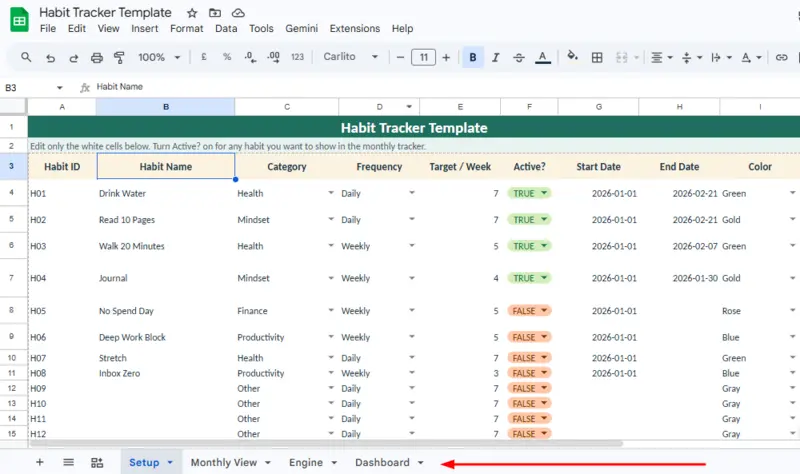
Our Free Google Sheets habit tracker template includes four built-in parts.
1. The Setup Tab
Here is where you’ll build your foundation. Jump into this tab first to:
- Add up to 12 core habits
- Assign custom categories
- Choose a daily, weekly, or custom frequency
- Set your personal target counts
- Toggle specific habits on or off easily
2. Monthly View
This is your daily workspace where the magic happens. Use this view to:
- Set and sync the current month
- Mark off your habits day by day
- Review your running completion totals
- Compare your targets against actual progress
- Monitor live streaks and completion rates
3. The Dashboard
Your personal bird’s-eye view. At the end of the week, check here to:
- See a summary of all active habits
- Review your average completion rate
- Identify your absolute top-performing habit
- Track your all-time best streak
- Spot your daily completion trends
4. The Engine Room
You won’t actually need to touch this part.
The Engine tab quietly handles all the complex formulas and calculations in the background. We tucked this away so your visible sheets stay beautifully clean, intuitive, and easy to use without accidentally deleting a formula.
The
Setuptab makes the tracker easy to customize. You can add up to 12 habits, assign categories, choose daily or weekly frequency, and turn habits on or off without changing the core structure.
How to download and open the tracker in Google Sheets
If you downloaded the tracker file, the next step is to open it in Google Sheets so you can use, customize, or embed it.
How to import the template into Google Sheets
To import the free Google habit tracker template into a Google Sheets, follow these step by step:
- Download the tracker file.
- Open Google Drive.
- Click New.
- Click File upload.
- Upload the tracker file.
- After it appears in Drive, right-click the file.
- Choose Open with > Google Sheets.
How to make your own copy of the Google Sheets habit tracker template
To make you own editable version of the tracker, once the template opens in Google Sheets:
- Click File
- Click Make a copy
- Save the new version to your Drive
How to use our Google Sheets habit tracker template
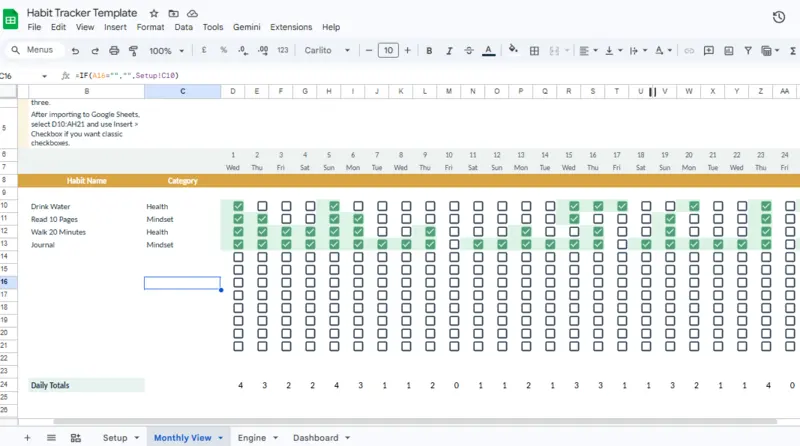
The
Monthly Viewis the main tracking area. It shows each habit, every day of the month, total completions, target counts, completion rate, and streak data in one layout.
The best habit tracker is not the most complex one. It is the one you will keep opening and updating.
Step 1: Start small (Seriously, don’t skip this)
I know it is incredibly tempting to overhaul your entire life on day one, but please, limit yourself to just 3 to 5 habits to start. Pick the foundational things you actually want to improve.
Examples to steal: Drink a glass of water first thing, read 10 pages, take a 20-minute walk, or do a quick brain-dump in your journal.
Step 2: Match the habit to the right frequency
A huge reason people fail at tracking is that they force-fit weekly tasks into a daily box. Not everything needs to happen every single day!
- Keep it daily for the micro-routines: Hydration, reading, stretching, and your sleep routine.
- Make it weekly for the heavy lifts: Deep work sessions, meal prep, inbox cleanups, or no-spend days.
Step 3: Give yourself realistic targets
If you haven’t worked out in a year, setting a 7-day-a-week workout target is just setting yourself up to feel bad. A good tracker should reflect real life.
Maybe starting with a target of 2 or 3 days a week is the perfect win right now. Be kind to your future self.
Pro tip: Do 20 pushups for 7 days.
Step 4: Set the clock and Start tracking your wins
Head over to the monthly tracker tab and select the current month. The calendar view will automatically sync up and adjust the dates for you.
Once you’ve saved the file in your Google Sheets, highlight the daily tracking grid and insert native Google Sheets checkboxes. So that when you finish a task, you can just mark off your habits on the days you nail them.
Step 5: Let the dashboard do the heavy lifting
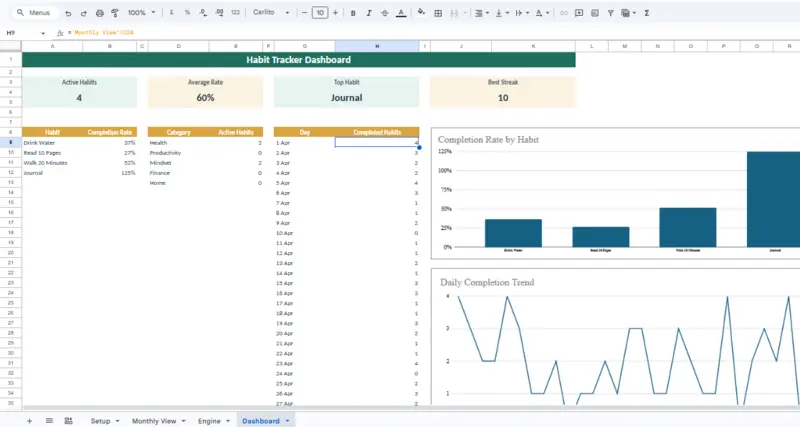
The
Dashboardgives you a fast overview of active habits, average completion rate, strongest habit, best streak, category totals, and daily progress trends.
At the end of the week, take a quick peek at your Dashboard tab. Don’t judge the data; just use it to learn. Use the dashboard to review your:
- consistency
- top-performing habits
- weak spots
- category balance
- daily progress trend
It will show you exactly where you are crushing it and where you might need to adjust your targets (your weak spots). Use those insights to tweak your plan for the following week.
Daily vs weekly habits: which should you track?
A lot of people struggle with habit tracking because they treat every habit the same way.
Daily Habit Tracking
Best for micro-behaviors that require consistent maintenance to form a permanent neural pathway.
- Reading
- Water intake
- Stretching
- Language practice
- Skincare
- Sleep habits
Weekly Structure Tracking
Best for high-effort tasks that are unrealistic to perform daily but vital for long-term systems.
- Meal prep
- Workouts
- Journaling
- Budgeting
- Deep work
- No-spend days
That is one reason our template is more useful than a simple daily-only tracker. It supports both.
Who should use this habit tracker template?
Our Google Sheets habit tracker template is a strong fit for:
- 🎯students
- 🎯creators
- 🎯freelancers
- 🎯founders
- 🎯remote workers
- 🎯people who already use Google Workspace regularly
- 🎯anyone who wants a free and customizable alternative to habit apps
It is especially useful if you want flexibility and visibility without paying for another subscription tool.
Google Sheets habit tracker template vs habit apps
Some users searching this keyword are not just looking for a template. They are comparing it to apps too.
Here is the practical difference:
| Option | Best For | Limitations |
|---|---|---|
|
|
Free use, customization, monthly visibility, editable workflow | More manual than an app |
|
|
Reminders, mobile-first experience, guided UX | Often less flexible and sometimes paid |
|
|
Simplicity and paper use | No automatic calculations or dashboard |
If you want something flexible, transparent, and free, Google Sheets is usually the better fit.
Why most habit trackers fail
Even a good tracker can fail if the system around it is too ambitious. Here are some Common mistakes:
Too Much Too Soon
Tracking 10+ habits simultaneously creates immediate psychological friction. The system collapses under its own weight. Start with 3–5 core behaviors.
Vague Definitions
“Exercise” is a wish; “Walk 20 minutes” is a defined habit. Vague habits are impossible to measure accurately and far too easy to ignore.
The “All or Nothing” Trap
Viewing a single missed day as a structural failure is the fastest way to quit. A premium tracking system is designed for quick recovery, not guilt.
The Measurement Gap
Tracking completion without analyzing your performance targets leads to stagnation. Premium tracking connects consistency directly with your actual results.
Can you make your own habit tracker in Google Sheets?
Yes, you can build your own habit tracker in Google Sheets from scratch.
To do this, create a new spreadsheet, add a column for your habits, and use the Insert > Checkbox feature across a 30-day row grid. However, using a pre-built template saves time and includes complex streak calculations.
Final thoughts
A Google Sheets habit tracker template should make habit tracking easier, not harder.
Our tracker is designed to give you:
- a clean monthly view
- flexible habit setup
- support for daily and weekly routines
- progress tracking
- streak tracking
- a dashboard for fast review
If you want a tracker you can actually use, open our Google Sheets habit tracker template, make a copy, and set up your first month.
Frequently Asked Questions
What is the best Google Sheets habit tracker template?
Is this a free Google Sheets habit tracker template?
Can I use this as a daily habit tracker template in Google Sheets?
How do I open the template in Google Sheets?
How do I make my own copy of the tracker?
Can I embed the tracker in my blog post?
Discover more from Rebuild With Intention
Subscribe to get the latest posts sent to your email.